


JourneyToCTA Diaries Part 12 - Account Contact Data Models
In the previous blog, we explored how customer privacy and payment data regulations shape Salesforce solution design, with a focus on compliance frameworks such as GDPR, HIPAA, CCPA, and Payment Card Industry Data Security Standard. We discussed how organizations can meet regulatory requirements through key architectural considerations including data residency, encryption, consent management, and the handling of data subject requests.
Building on this foundation, we examined payment-specific architectures and highlighted the importance of minimizing PCI scope through patterns such as tokenization and the use of payment gateways. We also clarified common misconceptions around Salesforce’s PCI compliance, emphasizing the shared responsibility model and the need for proper configuration of access controls, encryption, and integrations.
Finally, we reviewed multiple payment integration strategies—including hosted payment pages, API-driven approaches, and AppExchange-based solutions—and how these can be selected based on the organization’s system landscape. Together, these approaches demonstrate how secure, compliant, and scalable payment processing can be achieved within a Salesforce ecosystem.
In this blog we are focussing on Account Models in Salesforce and the different business usecases.
B2C & B2B Account Models in Salesforce
Designing an effective data model in Salesforce requires balancing both B2C (individual-focused) and B2B (organization-focused) use cases. While B2C models prioritize individuals and relationships, B2B models are centered around organizations, hierarchies, and complex account structures. Selecting the right approach is a foundational architectural decision that impacts scalability, reporting, and user experience.
B2C Account Models
B2C scenarios focus on individuals as customers, requiring flexible models to represent people and their relationships.
Person Accounts
Person Accounts combine Account and Contact fields into a single record, representing an individual customer as a unified entity. This simplifies the data model and user experience, making it a preferred choice for many B2C implementations. However, architects must account for integration and feature nuances when adopting this model.

Pros:
Simplified data model (single record for individual) → improved UX and reporting
Native support for B2C use cases (Sales, Service, Experience Cloud)
Eliminates need for Account-Contact joins in logic and integrations'
Cons:
Irreversible enablement and added complexity in org setup
Some feature and AppExchange compatibility limitations
Integration complexity (external systems often expect separate Account/Contact objects)
Data migration and governance require careful planning
👉 CTA View: Preferred model for most B2C implementations due to its simplicity and alignment with individual-centric use cases. However, it requires early architectural commitment, careful integration design, and validation of AppExchange compatibility. Best suited when the majority of interactions are with individuals rather than organizations.
Private Contacts
The Private Contact model allows Contacts without associated Accounts. While simple, it is generally not recommended due to limitations in reporting, scalability, and data governance, often leading to fragmented data.
Pros:
Simple to implement (no Account dependency)
Minimal configuration overhead
Cons:
Not scalable for enterprise use
Weak reporting and data structure
Limited support for sharing, ownership, and hierarchy
Poor alignment with standard Salesforce capabilities
👉 CTA View: Generally not recommended for production-grade architectures.
Household Model
The Household model groups multiple Contacts under a single Account, typically representing families or related individuals. This is useful in industries like Financial Services, where relationships between individuals are critical, and interactions can be tracked at both individual and household levels.

Pros:
Supports relationship-based selling (family, group structures)
Enables roll-up of activities and opportunities at household level
Commonly aligned with industry data models (e.g., Financial Services Cloud)
Cons:
Added complexity in data model and logic
Requires custom handling for attribution and reporting
Sharing and ownership models can become complex
👉 CTA View: Strong fit for industries requiring relationship modelling (e.g., Financial Services). Should be used when business processes depend on group-level interactions. Requires careful handling of data ownership, attribution, and sharing models.
Individual Account Model
In this approach, each Contact is paired with a corresponding Account (often with identical names). The Account acts as a container for ownership and sharing, while the Contact represents the individual. This provides flexibility while maintaining compatibility with standard Salesforce features.

Pros:
Full compatibility with standard Salesforce features
Clean separation of Account (ownership/sharing) and Contact (person)
Easier integration with external systems
Cons:
Data duplication (Account + Contact per individual)
Increased storage and data management overhead
More complex reporting compared to Person Accounts
👉 CTA View: A flexible and safe alternative to Person Accounts, especially in environments with complex integrations or feature constraints. While it introduces data duplication, it provides maximum compatibility and control, making it suitable for hybrid B2B/B2C scenarios.
Bucket Model
The Bucket Model places all Contacts under a single Account. While easy to implement, it is not scalable and introduces challenges in data management, reporting, and security. It is typically avoided in enterprise-grade solutions.

Pros:
Extremely simple to implement
Minimal configuration effort
Cons:
Not scalable (data volume and performance issues)
Poor data governance and reporting
Security and sharing challenges
Breaks standard Salesforce design principles
👉 CTA View: Suitable only for temporary or low-maturity implementations.
B2B Account Models
B2B scenarios revolve around organizations, where Accounts represent companies and Contacts represent individuals within those organizations.
Standard B2B Model (Account-Contact)
The most common model in Salesforce, where an Account represents a company and multiple Contacts are associated with it. Opportunities, Cases, and other interactions are linked to the Account, providing a consolidated view of customer engagement at the organizational level.
Pros:
Native Salesforce model with full feature support
Scales well for most enterprise use cases
Strong alignment with sales, service, and reporting processes
Simplifies integration with ERP and external systems
Cons:
Limited flexibility for representing complex hierarchies
Requires additional modelling for multi-entity relationships
👉 CTA View: The default and most robust model for B2B scenarios. It aligns well with Salesforce’s core capabilities and supports scalability, integrations, and standard processes. Recommended as the baseline for most enterprise implementations.
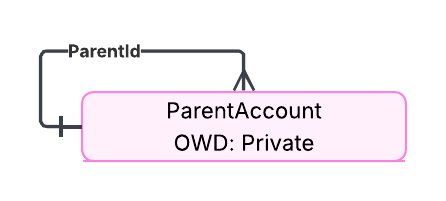
Account Hierarchies (Parent-Child Accounts)
This model represents organizational structures using parent-child relationships between Accounts. It is ideal for enterprises with multiple subsidiaries or business units, enabling roll-up reporting and visibility across the hierarchy.
Pros:
Supports complex organizational structures
Enables roll-up reporting and visibility
Aligns well with enterprise customer structures
Cons:
Limited native roll-up capabilities (often requires customization)
Sharing and ownership can become complex
Performance considerations for deep hierarchies
👉 CTA View: Essential for modeling complex enterprise structures, but requires additional design for roll-ups, reporting, and sharing. Best used when hierarchical visibility is a key requirement, with consideration for performance at scale.
Global Enterprise Account
In this approach, a single global Account represents the entire organization, with all Contacts, Cases, and Opportunities linked to it. While it provides a unified customer view, it can become complex in terms of ownership, sharing, and reporting at scale.
Pros:
Single view of the customer across all interactions
Simplified reporting at a global level
Easier to manage from a high-level relationship perspective
Cons:
Ownership and sharing challenges at scale
Difficult to segment data by region or business unit
Can lead to performance and data volume issues
Limited operational flexibility
👉 CTA View: Suitable for organizations prioritizing a single consolidated customer view, but can introduce challenges in ownership, sharing, and operational segmentation. Use cautiously in large-scale or highly distributed environments.
Location-Specific Accounts
Separate Accounts are created for each region or business unit, each with its own Contacts, Opportunities, and Cases. This model simplifies ownership, sharing, and operational tracking, making it easier to manage large, distributed organizations.
Pros:
Better control over ownership and sharing
Easier tracking of regional performance and interactions
Scales well for global organizations
Aligns with ERP and operational systems
Cons:
Requires careful design for cross-account reporting
Potential duplication of data across accounts
Requires hierarchy or aggregation logic for global view
👉 CTA View: Highly recommended for global enterprises requiring regional autonomy, clear ownership, and scalable operations. Often used in combination with hierarchies to balance local execution with global visibility.
Contacts to Multiple Accounts Models
In both B2C and B2B scenarios, individuals may be associated with multiple Accounts, requiring flexible relationship modelling.
Account Contact Roles
A standard Salesforce feature that allows Contacts to be associated with multiple Accounts in a limited capacity. However, it does not support custom fields, record types, validation rules, workflows, or field history tracking, and sharing is derived solely from the Account.
Contacts to Multiple Accounts (Account Contact Relationships)
An enhanced standard capability that supports custom fields, layouts, validation rules, workflows, triggers, record types, and field history. It also provides more flexible sharing, derived from both Account and Contact, making it suitable for more complex relationship management.
Contacts to Multiple Accounts vs Account Contact Roles
Feature / Capability | Contacts to Multiple Accounts | Account Contact Roles |
Standard Salesforce Feature | ✅ Yes | ✅ Yes |
Custom Fields Support | ✅ Yes | ❌ No |
Custom Layouts | ✅ Yes | ❌ No |
Record Types | ❌ No | ❌ No |
Field History Tracking | ❌ No | ❌ No |
Validation Rules | ✅ Yes | ❌ No |
Automation (Flow, Workflow, PB) | ✅ Yes | ❌ No |
Apex Triggers | ✅ Yes | ❌ No |
Custom Actions | ✅ Yes | ❌ No |
API Access | ✅ Yes | ✅ Yes |
Multiple Relationships per Contact | ❌ No (single related list) | ✅ Yes |
Storage Impact | ❌ No | ❌ No |
Sharing Model | Derived from Account & Contact | Derived from Account |
Reporting | Custom Report Types | Standard + Custom Reports |
User Interface Support | Lightning, Classic, Mobile | Limited (UI constraints, mostly Classic) |
👉 CTA View: In most modern Salesforce architectures, Account Contact Roles are considered legacy/limited, while Contacts to Multiple Accounts provides the flexibility needed for scalable, enterprise-grade solutions.
Key Takeaways
Selecting the right data model—across B2C, B2B, and relationship management patterns—plays a critical role in ensuring long-term success. Decisions around Person Accounts vs 1:1 models, account hierarchies, and multi-account relationships directly impact data governance, sharing models, reporting, and integration complexity. Similarly, in payment architectures, leveraging tokenization, payment gateways, and hosted payment patterns helps reduce compliance scope while maintaining security and scalability.



Comments